
When it comes to CRM and ERP software, Microsoft Dynamics 365 is one of the most powerful business platforms available today. But for many businesses especially small and mid-sized ones, finding low cost Dynamics 365 licensing plans can feel overwhelming.
You want powerful features, but you don’t want to pay for tools your team won’t use. And with so many licensing options, price points, and subscription models, it’s easy to get stuck between affordable CRM options and feature-rich enterprise packages.
The good news? You can get the right budget CRM licensing plans without sacrificing essential tools.
In this guide, we’ll walk you through everything you need to know!
Before we dig into how to save money, it’s important to understand why Dynamics 365 licensing is such a big deal.
Your license doesn’t just unlock access, it determines:
Choosing the wrong license can lead to overpaying, underusing features, or even restricting your team’s productivity. That’s why getting the right license is the first step toward smarter, more affordable CRM and Microsoft deals.
Choosing low cost Dynamics 365 licensing plans starts with matching your team to the right license type.
Here are the most common options:
These are for people who need full access to all features in a given app, sales managers, finance leads, or operations teams. Full licenses are the most expensive, so they should be limited to users who truly need them.
If a user only needs to view data, input time, or run reports, this is the budget-friendly way to go. Team Member licenses cost much less and are perfect for general staff, assistants, or executives who need oversight but not deep interaction.
Available within ERP-focused plans (like Unified Operations), these licenses allow for transaction-level access to tasks like inventory management, purchasing, or warehouse operations, ideal for logistics and supply chain roles.
Choosing the right Dynamics 365 license doesn’t have to be complicated!
Now that you understand the basic structure, let’s explore how to actually reduce your Dynamics 365 price while still getting the features your team needs.
Not everyone in your company needs a full license. You can save hundreds (or even thousands) each month by assigning Team Member licenses to light users, and Full User licenses only where necessary.
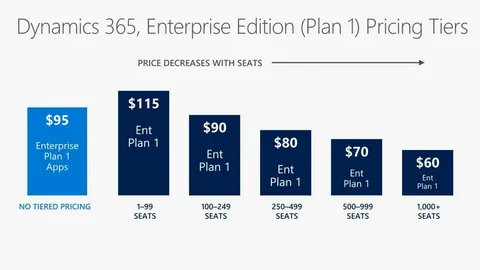
For example, instead of giving every salesperson a $95 Enterprise Sales license, give your SDRs a Team Member license and only your closers the full version.
This is one of the simplest ways to build a budget CRM licensing plans without cutting functionality.
Buying directly from Microsoft often means paying list price. But certified Microsoft partners and Cloud Solution Providers (CSPs) offer the same licenses often at discounted rates, with added support, onboarding, and bundles.
Many providers offer local service, licensing audits, or package deals. If you’re looking for affordable CRM options, partners are the way to go.
You can license Dynamics 365 apps individually or as part of bundled plans like:
If your business only needs CRM, the Customer Engagement Plan may be more cost-effective than buying multiple apps separately. But if you only need one or two specific features, individual apps might save more.
Did you know many CRM providers and resellers offer discounts at the end of the quarter or fiscal year?
Waiting for seasonal promotions, Microsoft partner sales, or contract renewal periods can help you lock in better Dynamics 365 pricing without losing access to core features.
Monthly plans offer flexibility, but multi-year agreements often come with lower monthly rates and price protection. If you’re confident in using Dynamics 365 for the next few years, this is a great way to stabilize your budget.
It also makes financial forecasting easier and shields you from potential price increases down the line.
Many Dynamics 365 plans include access to tools like:
These tools help you extend your CRM without buying third-party software, helping keep costs down while still building powerful customizations.
If you’re focused on low cost Dynamics 365 licensing plans, these apps offer solid value for their price:
| App | Best For | Price (starting) |
|---|---|---|
| Dynamics 365 Business Central | SMB ERP & Finance | Essentials: $70 / Premium: $100 |
| Dynamics 365 for Sales (Professional) | CRM Sales Tools | $65 per user/month |
| Dynamics 365 for Customer Service (Professional) | Support Teams | $50 per user/month |
| Dynamics 365 Marketing | Email, campaigns | $750 (with limitations) |
| Team Member License | Light users | $8 per user/month |
Finding low cost Dynamics 365 licensing plans is totally possible, you just need to know where to look, what to ask for, and how to structure your plan.
The goal isn’t just to spend less, it’s to make every dollar count by giving your team the tools they need without overpaying for what they don’t.
By working with a certified partner, using smart license mixes, and timing your purchase right, you can build a powerful CRM and ERP solutions that fits your budget and scales with your growth.
Want to optimize your Dynamics 365 licensing? Let our experts guide you to smarter choices.
Get the latest updates, exclusive offers, and insider news delivered straight to your inbox. We never sell your data, and we never send spam, just great content!
- Powered by -

Esclatech © 2025 | All Rights Reserved | A Cowry Solutions Company | EULA | Privacy Policy
